Viewing user audit alerts
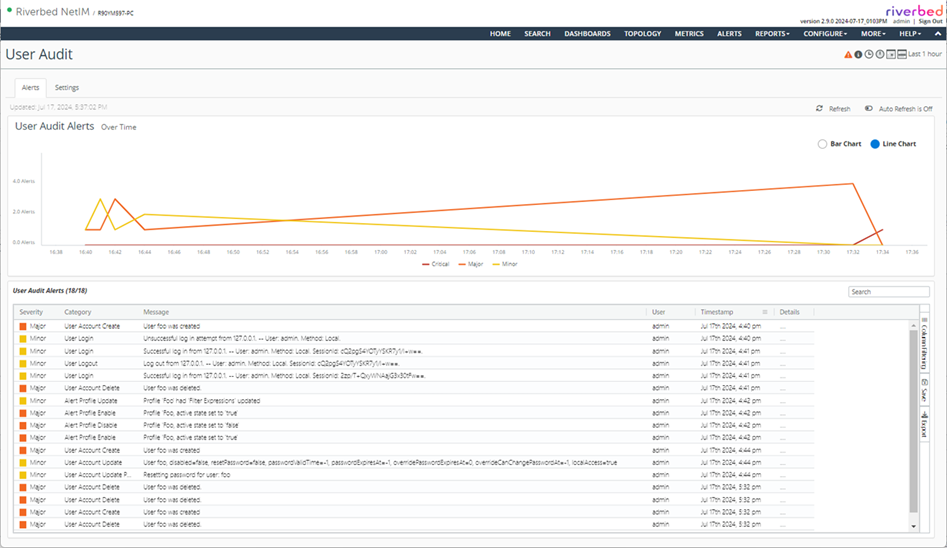
User audit alerts are displayed under Configure > All Settings > Administer: User Audit on the Alerts tab.
The page contains a graph that shows the number of user audit alerts over time. The time window can be set using the standard time controls in the upper right corner. At the bottom of the page, the list of user audit alerts for the selected time window is shown.
User audit page - Alerts
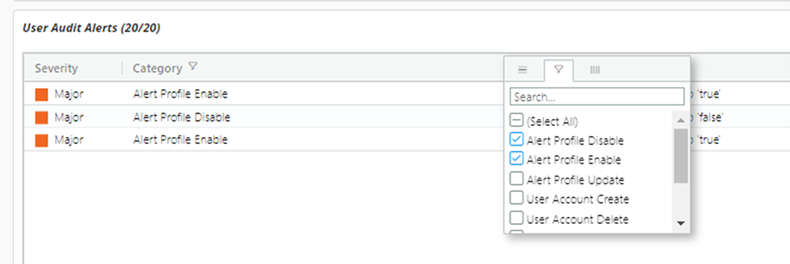
These entries can be further filtered by clicking the column header menu and selecting from the list of values. In the following screenshot, the list of alerts is filtered to include just the alerts for Alerting Profile Enable and Alert Profile Disable.
Filtering user audit alerts
About user audit alert actions
This section lists the user audit alert actions and default severities.
User account actions
Action | Severity |
|---|
User Account Disable | Major |
User Account Enable | Major |
User Account Delete | Major |
User Account Create | Major |
User Account Update Roles | Major |
User Account Update Password | Minor |
User Account Update | Minor |
Alert profile actions
Action | Severity |
|---|
Alert Profile Create | Major |
Alert Profile Delete | Major |
Alert Profile Enable | Major |
Alert Profile Disable | Major |
Alert Profile Update | Minor |
Alert Profile Update Name | Minor |
Alert Profile Update Description | Minor |
Alert Profile Add Device | Minor |
Alert Profile Remove Device | Minor |
Device actions
Action | Severity |
|---|
Device Add | Major |
Device Delete | Major |
Device Update | Minor |
Group actions
Action | Severity |
|---|
Group Create | Major |
Group Delete | Major |
Group Add Device | Minor |
Group Remove Device | Minor |
Group Add Group | Minor |
Group Remove Group | Minor |
Group Update | Minor |
User login actions
Action | Severity |
|---|
User Login | Minor |
User Logout | Minor |
User audit logging actions
Action | Severity |
|---|
User Audit Logging Enable | Critical |
User Audit Logging Disable | Critical |
User audit profile actions
Action | Severity |
|---|
User Audit Alert Profile Enable | Critical |
User Audit Alert Profile Disable | Critical |
User Audit Alert Profile Update | Major |
Notification actions
Action | Severity |
|---|
Notification Method Update | Minor |
Notification Method Remove | Minor |
About the severity mapping file
The severity value for each action can be configured in the EventSeverityMappings.res file. An example snippet is shown in this figure.
Severity mapping file

Severity is mapped to integer values as follows:
• 1 = minor
• 2 = major
• 3 = critical
You must restart the NetIM core services after changing the EventSeverityMappings.res file for the change to take effect.