Configuring VM system disk usage monitor
1. Log in to the manager VM.
2. Run the command system monitor configure and choose Disk Usage Monitor.
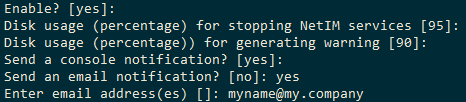
3. Follow the instructions and enter the requested input. It should look like the following figure.
VM system disk usage monitor example
4. To confirm the configuration, run the command system monitor show configuration.
5. To see the state of the latest monitoring, run the command system monitor show state.