Migrating Windows Services filters
Text-based filter configurations for Windows Services used in previous NetIM versions are not compatible with version 2.11.0 and above. These configurations must be manually migrated.
The following is an example of a Windows Services filter definition text file.
Windows Services filter definition text file
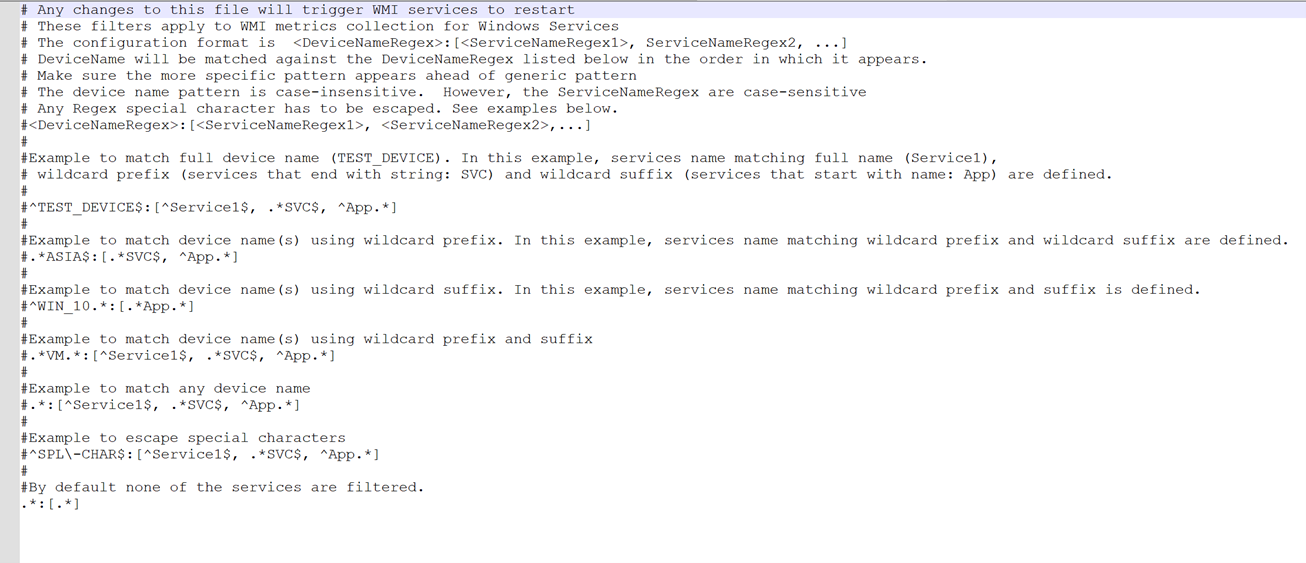
Each line in the file contains two parts, separated by a colon:
• First part—Regular expression to match the device name.
• Second part—Regular expression to match the Name field in the Windows Service metric class.
For each line in the file:
1. Add a metric component filter.
2. Select Windows Services as the metric class. The component field will default to Name.
3. Enter the regular expression(s) from your previous configuration.
4. Assign to target devices.
5. Identify the devices that match the original filter.
6. Create or modify a polling profile that includes these devices.
7. Assign the filter to the Windows Service metric in the profile.